Fun 2D Shape Recognition Digital Math Activity for Kids

Learning shapes may seem like a basic preschool skill, but it actually lays the groundwork for so many higher-level math, reading, and spatial reasoning skills. When kids begin recognizing 2D shapes, they’re also strengthening visual discrimination, learning to classify, and building vocabulary that supports both literacy and math.
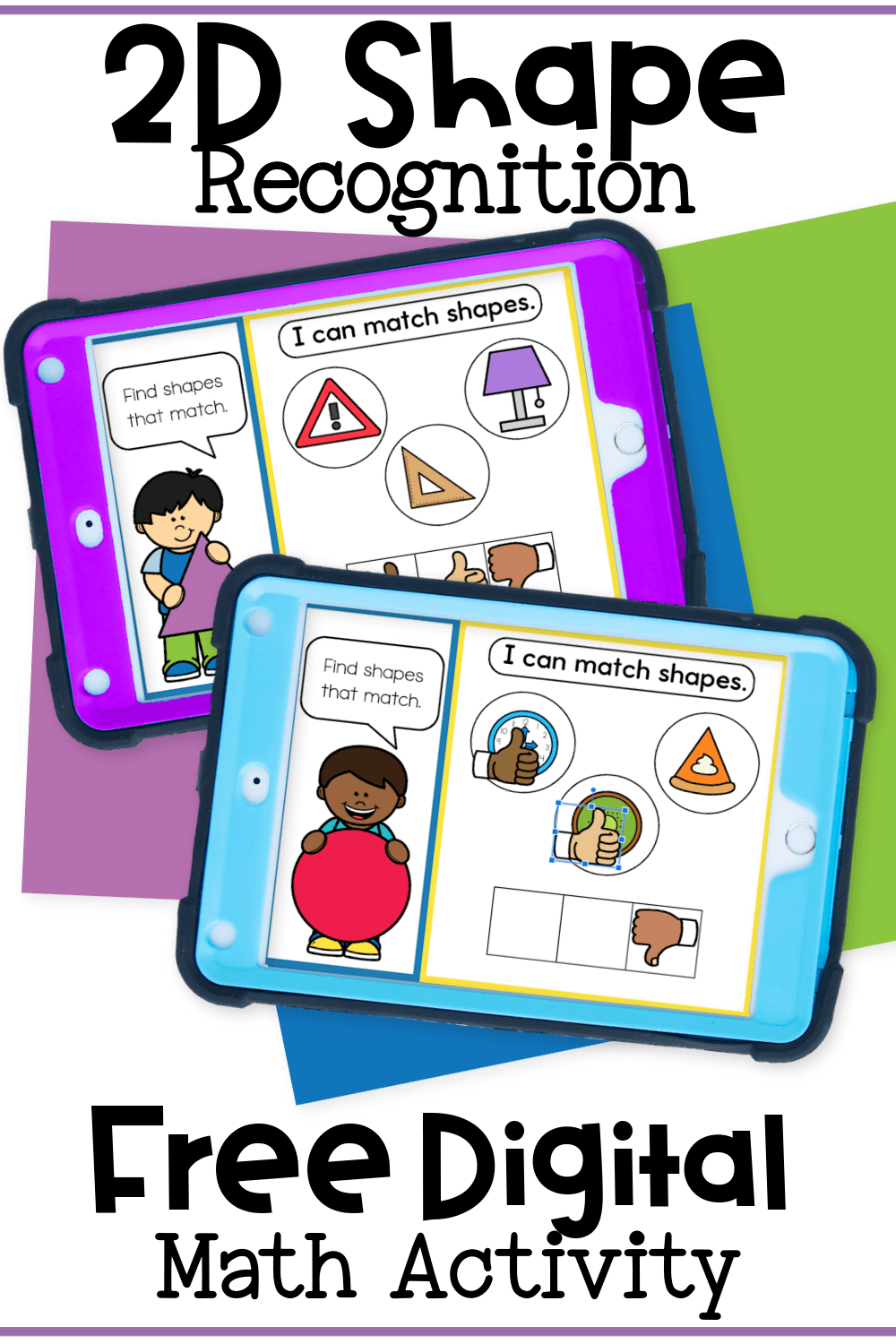
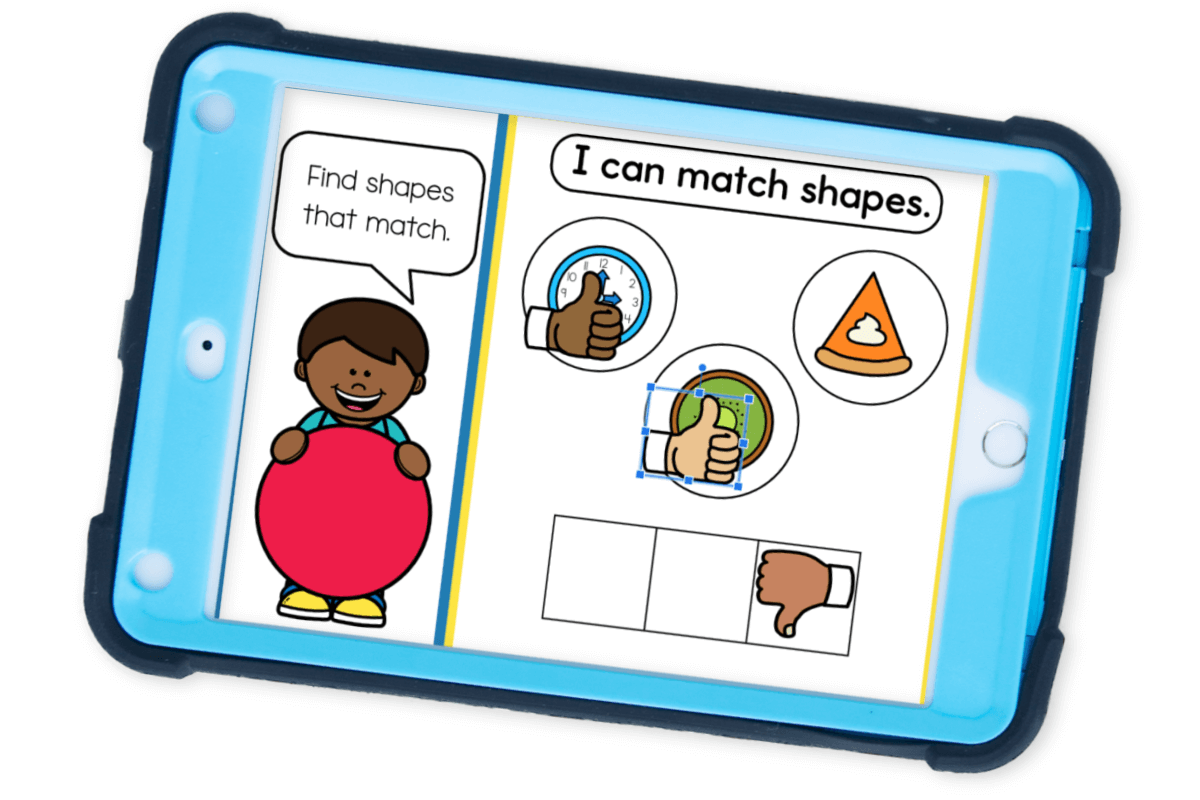
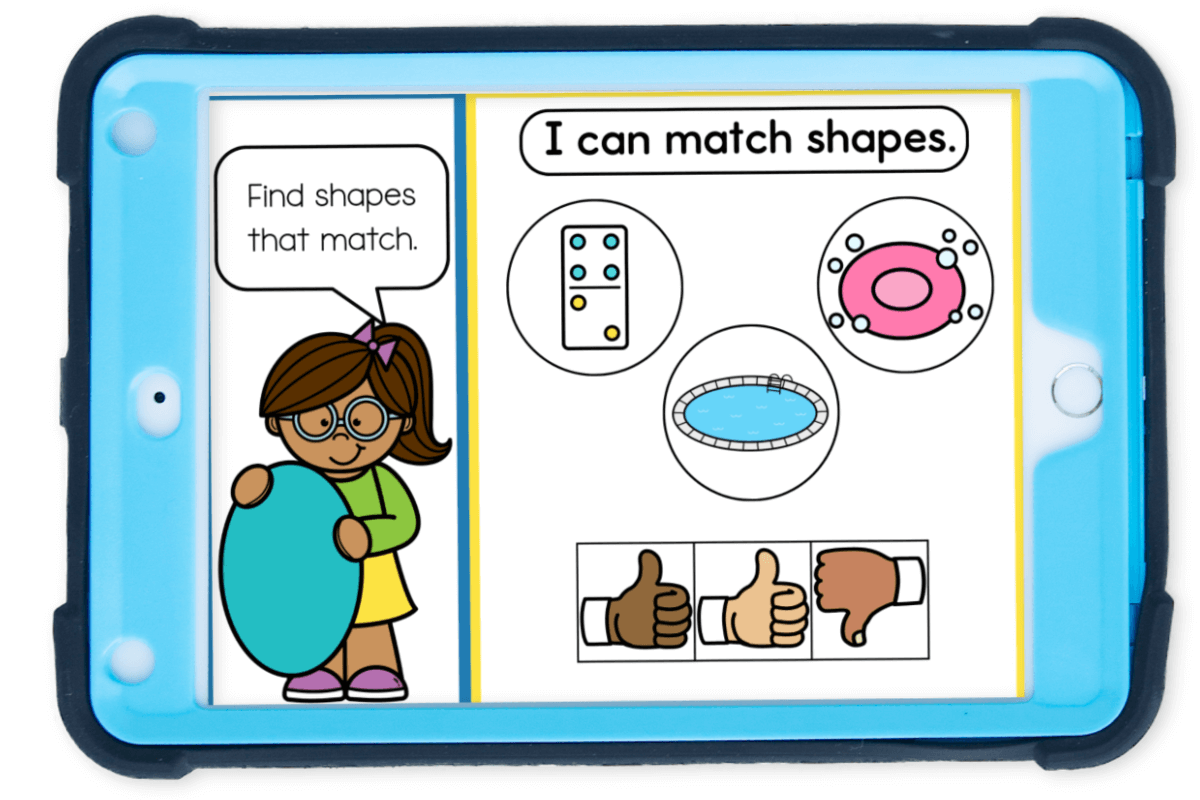
This Free 2D Shape Recognition Digital Math Activity for Google Slides and Seesaw is a simple, no-prep way to introduce or review 2D shapes in a format that feels more like a game than a lesson. Kids give each image a “thumbs up” if it matches the shape they’re learning or a “thumbs down” if it doesn’t. It’s engaging, accessible, and sneakily effective.
Recommended Grade Level:

Introducing 2D Shapes to Young Learners
When introducing 2D shape recognition to preschoolers or kindergarteners, it’s important to start with clear, simple language and lots of real-life examples. Focus on naming, pointing, touching, and playing. For preschoolers, you might begin with phrases like:
- “This is a circle. It’s round and has no corners.”
- “This triangle has 3 straight sides. Let’s count them together!”
Start with the most familiar shapes, circle, square, triangle, and rectangle, before adding more complex ones like oval, hexagon, and octagon. Don’t worry if your students can’t remember all the names right away. Exposure through play, repetition, and conversation is what helps it stick.
Try even more 2D shape activities with your kids!
Get More Digital Shape Activities Here!

What Shapes Should Preschool and Kindergarten Students Know?
The answer depends a bit on your curriculum or state standards, but here’s a general guide:
Preschool Shapes:
- Circle
- Square
- Triangle
- Rectangle
- Heart and star (not in most formal standards, but commonly included because kids know and love them!)
Kindergarten Shapes:
- Circle
- Square
- Triangle
- Rectangle
- Hexagon
- Oval
- Octagon
- Real-world objects that represent these shapes in different sizes and orientations
Many preschool programs include hearts and stars simply because they’re recognizable and fun. While they may not be listed in formal standards, they provide confidence-building wins for young learners and help bridge play with academics.
We included stars and hearts in this 2D shape recognition activity, but you can easily remove them or skip them if you are not covering them in your program.

Skills Covered with This 2D Shape Recognition Activity
This 2D shape recognition digital activity may look simple on the surface, but it’s doing big-time work behind the scenes to build foundational academic skills. Yes, it teaches shape names, but it also supports a wide range of early childhood development goals in math, motor skills, language, and logic.
Here’s a breakdown of the specific skills your learners will practice as they play.
Visual Discrimination
One of the most important early math skills for preschoolers and kindergarteners is visual discrimination… the ability to see the differences between similar objects.
In this 2D shape recognition activity, kids look closely at shapes and decide whether the objects match the target shape. For example, they may need to determine whether something is a square or just almost a square.
This builds the brain’s ability to notice and categorize small visual details, which is essential not just for math, but also for reading and letter recognition later on.
Attention to Detail
Shape recognition requires children to slow down and observe.
This 2D shape recognition activity encourages them to pay attention to the number of sides, type of corners, and general orientation of a shape before giving it a thumbs up or thumbs down.
That careful observation builds attention to detail, a skill that transfers into writing letters correctly, solving math problems, and even following multi-step directions.
Fine Motor Skills
While it’s a digital activity, the act of clicking, dragging, and placing the thumbs up or thumbs down symbols supports fine motor development.
Children are working on hand-eye coordination and finger strength, both of which are important for tasks like using scissors, coloring, or writing.
Using a tablet or touch screen adds a tactile element that can make these skills even more accessible for kids who struggle with traditional pencil-and-paper tasks.
Math Vocabulary and Language Development
This 2D shape recognition activity also provides a natural opportunity to introduce and reinforce early math vocabulary.
Terms like “sides,” “corners,” “round,” and “equal” come up naturally as you guide kids through the game. Even if students aren’t yet reading or writing, simply hearing and repeating these words in context helps them begin building the language foundation for mathematical thinking.
You can encourage this by asking open-ended questions like, “What makes that a triangle?” or “How do you know this isn’t a rectangle?”
Logic and Reasoning Skills
One of the most powerful benefits of this 2D shape recognition activity is how it helps young children develop logic and reasoning.
Every time they decide whether to give a thumbs up or thumbs down, they’re engaging in critical thinking. They have to assess the information, compare it to what they know, and make a decision.
These early moments of problem-solving may feel like play, but they’re laying the groundwork for much deeper analytical thinking as they grow.
How This 2D Shape Recognition Activity Supports Kindergarten Math Standards
Kindergarten geometry standards often include more than just naming shapes. Kids are expected to:
- Identify 2D shapes by name
- Recognize shapes in real-life objects
- Sort and classify shapes
- Identify shapes regardless of size, orientation, or position
- Compare 2D shapes based on attributes like number of sides and corners
This 2D shape recognition digital activity aligns perfectly with those goals. By asking kids to decide whether a shape matches or not, they are:
✔️ Practicing vocabulary
✔️ Strengthening visual discrimination
✔️ Making shape-to-object connections
✔️ Comparing and contrasting shapes based on their properties
✔️ Thinking critically about spatial positioning
And because the 2D shape recognition activity is completely visual, kids of all reading levels can participate independently or with support.

How to Use This 2D Shape Recognition Activity
One of my favorite things about this 2D Shape recognition resource is how versatile and no-prep it is. Whether you’re in a classroom, a homeschool setting, or doing speech and OT sessions, this activity slides right into your day (see what I did there? 😉).
Kids will see a slide with a shape prompt (like “Find the matching shape!”), then drag the matching thumbs up over the images that match.
That’s it! No printing, laminating, or cutting required. Just open and play! You can project it during circle time, use it in small groups, or assign it individually for digital centers.
And for those early finishers? Just let them play the 2D Shape Recognition activity again with a new shape!
How to Get the Activity
- Enter your email below and then check your inbox to get the 2D Shape Recognition activity.
- When you open the file you can click on the format that you prefer to use: Google Slides®, Seesaw® or upgrade to self-checking Boom Cards®.
- If you are downloading the Google Slides version you will be prompted to “Make a copy”. This is an important step you need to complete to make sure you get an editable version to share with your students!
- In Slides, make sure you are in “Edit” mode, as opposed to “Present” mode. You will see the “Present” button in the upper right-hand corner.
- In Slides, just click on the symbol box to highlight it in blue and drag it when the cursor resembles a plus sign with an arrow on each end.
- If you choose the Seesaw version, click the Seesaw image to instantly add it to your Seesaw library.
- Use the Text tool (click on the large T) to be able to highlight each symbol to move it.
- To upgrade to self-checking Boom Cards®, click on the image in the download PDF to purchase the deck to use with your students.
- Or check out the Apple Counting Self-Checking Boom Cards® here!
- Finally, if you choose self-correcting Boom Cards, remember you must be connected to the Internet in order for the cards to work.
How to Differentiate for Different Learners
We all know that every classroom and homeschool has a variety of learners. This activity can be easily adjusted to support different levels and needs:
For Beginners:
Start with only a couple of slides at a time. Focus on verbal identification and name the shapes together. Use physical shapes alongside the digital slides for tactile reinforcement.
For Advanced Learners:
Ask students to explain why a shape is or isn’t a match. You can also encourage them to describe attributes (“This shape has 4 equal sides, so it’s a square”) or sort additional objects by shape after the activity.
For Visual or Motor Support:
Use a tablet or touch screen for easier access. You can also walk through the activity together and offer verbal support as needed. Pairing the activity with hands-on manipulatives or shape tracing can support comprehension and retention.
Easy Ways to Extend the Activity
Looking to keep the shape learning going after the slides are done? Try these playful extensions:
Shape Hunt at Home or in the Classroom
Send students on a scavenger hunt to find real objects that match each shape… like clocks (circle), doors (rectangle), and slices of pizza (triangle).
Shape Sorting Bin
Grab mini erasers, paper cutouts, or random small objects and have your learners sort them into shape categories. This is great for morning tubs or math centers.
Cut and Paste Collage
Give kids magazines or shape cutouts and let them create their own shape collage. Label the shapes together as they glue!
Shape Builders with Play Dough or Craft Sticks
Invite students to form each shape with play dough or build them with sticks. This reinforces attributes like the number of sides and angles in a super hands-on way. This set of shape play dough mats is a great resource!
Shape Songs to Reinforce Learning
A few of our favorite YouTube shape songs that pair perfectly with this digital activity:
Shapes Song by The Singing Walrus
Perfect for movement and basic shape recognition with lots of repetition.
‘Shape Up!’ by Jack Hartmann
Shape Books to Add to Your Lesson
As an Amazon Affiliate I may earn a small commission on linked products.
Pair this digital activity with a few fun shape-themed picture books to build connections between print and math:
Circle, Square, Moose by Kelly Bingham
This hilarious story blends humor, shapes, and storytelling as Moose causes chaos in a book that was supposed to be all about basic geometry. Great for engaging kids who love silly stories.
Mouse Shapes by Ellen Stoll Walsh
This sweet, simple story follows three mice as they hide from a cat and use shapes to build scenes and tell their own story. It’s a wonderful way to show how shapes can be used to create.
This Is a Book of Shapes by Kenneth Kraegel
This book is bold, quirky, and full of unexpected humor as it presents traditional shapes in very non-traditional ways. Great for sparking conversations and critical thinking!
Why Teachers and Parents Love This Activity
Whether you’re teaching in a busy preschool classroom, navigating homeschool life with a kindergartener, or supporting a child with special needs at home, there’s one thing we all have in common… we need learning activities that actually work and don’t drain every last ounce of our energy.
That’s exactly why this 2D Shape Recognition digital math activity for Google Slides® and Seesaw® has become a fast favorite. It’s colorful, interactive, easy to use, and developmentally spot-on for early learners. Plus, there’s zero prep involved.
No cutting.
No laminating.
No tiny pieces to lose under the couch.
Just open the link, assign it to your learners, and let them explore shapes while having fun.
You can use it for:
- Shape-focused math centers in your preschool or kindergarten classroom
- Independent practice on tablets or Chromebooks
- Small group intervention for reinforcing shape identification
- Whole group lessons projected on your smart board during circle time
- A no-stress, high-engagement learning activity at home
And the best part? This 2D Shape Recognition digital activity for Google Slides® and Seesaw® is totally FREE.
Because I see how hard you’re working… and I believe powerful teaching tools should be accessible, simple to use, and joyful for both you and your learners. 💕
More Math Fun from I Teach Too:
- Summer I Spy Counting Activity
- Flower Theme AB Patterns Digital and Printable Activity
- Back to School Number Identification Activity
- Head to our shape activity collection for playful digital math centers that actually make learning stick.

Join the I Teach Too Newsletter and Get Your 2D Shape Recognition Digital Activity Here!